Exploring Free Resources for Teaching Scratch Remotely
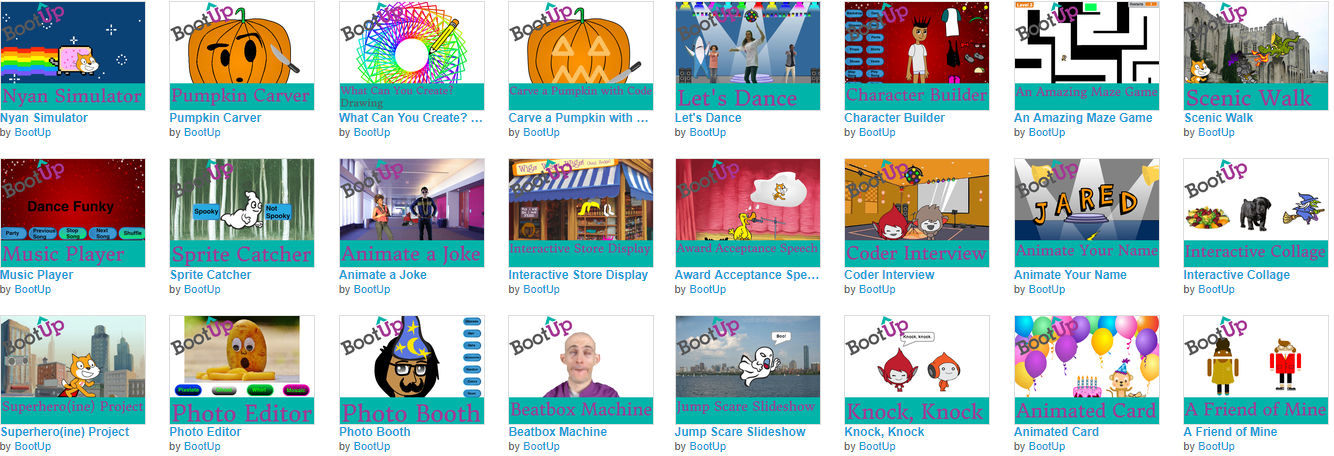
With many schools across the country teaching remotely, there is a need for free resources that enable kids to learn how to use Scratch through self-paced, interest-driven projects. This session explores hundreds of free resources that you can begin using with remote or in-person classes today. In particular, this session will explore free video and visual walkthroughs for developing a project in Scratch, project extensions, debugging exercises, remixing practices, reverse engineering practices, and lesson plans.
Video Walkthrough

Coder Resources: How to Use Self-paced walkthroughs
Beginner Projects


Intermediate Projects


Advanced Projects


Remixing resources
Option 1: Open the example project at the bottom of the document you’ve been using, read the comments in each sprite, change the code to do something different.

Option 2: Open this studio with completed projects and remix one of the projects.

Option 3: Open this studio with incomplete projects and add to one of the project starters.
Reverse Engineering
Student-facing video
Teacher-facing video
Free Scratch Lesson Plans and more Coder Resources

Free ScratchJr Lesson Plans

Additional Resources
Listen to the #CSK8 podcast
The #CSK8 Podcast explores research, experiences, and perspectives on computer science education with a focus on grades K-8. My hope is to support and promote the #CSK8 and #CSforALL community members by interviewing guests and unpacking scholarship in relation to computer science education.
Computer Science Education Pages
Media Arts & Technology Makerspace
Twitter List
Click here to visit a list with a direct feed of users who discuss the various topics that pertain to this topic.
YouTube Playlists
The following links provide videos related to various topics that pertain to this topic:
In this episode I unpack my dissertation, which explores the intersections of videogames, music, and computer science education.
In this episode I introduce approaches to using Scratch for project-based learning, including backwards, inquiry-based, and emergent project designs.
In this episode I describe considerations for facilitating multiple programming languages in one space.
Building off the previous episode on depression, suicide, and CS education, this episode is a supercut of guests responding to how they take care of themselves and stave off burnout. If you have not done so yet, I highly recommend listening to part 1, part 2, and part 3 to hear perspectives from other guests.
In honor of national suicide prevention week, in this week’s episode replay I read a paper I wrote on the topic of depression, suicide, and computer science education. This paper is formatted into the following sections: 1) A vignette on my own experiences coping with depression and suicide; 2) Statistics on depression and suicide as it relates to various populations computer science educators work with; 3) A vignette of a computer science educator helping a student through depression and suicidal thoughts; 4) Risk factors and warning signs; 5) Suggestions for providing support; 6) A vignette from a computer science educator's perspective on a student who committed suicide; and 7) Closing thoughts.
If you or anyone you know are experiencing signs of depression or suicidal ideation, please reach out to local healthcare professionals or call the National Suicide Prevention Lifeline: 1-800-273-8255
In this episode I unpack the impact of an apprenticeship of observation and what computer science educators can do about it.
In this episode I unpack Loehr and Schwartz’s (2001) publication titled “The making of a corporate athlete",” which provides some suggestions relevant to educators interested in performing at their best by focusing on rest and recovery.
In the 200th episode of the #CSK8 Podcast I want to take a moment to thank everyone for listening over the years and to share some thoughts around the content I’m creating and the future of this podcast.
In this episode I discuss an approach I’ve used for encouraging critical thinking and dialogue through individualized feedback and group discussion.
This mini session describes considerations for facilitating multiple programming languages in one space. I provide video examples of what it looks like when young coders select from four different programming languages to create projects of interest. Following an overview of what coders created in the classes I designed and facilitated, I discuss considerations for simultaneously facilitating multiple languages; this discussion includes suggestions for selecting and creating resources, questioning techniques, peer-to-peer mentoring, room setup, and more.
Teacher burnout has always been a problem in the field of education; however, the past couple of years has exacerbated the issue. With teacher shortages continuing to be an issue across the nation, we need to discuss strategies for preventing burnout in the field.
In addition, computer science teachers face unique challenges when it comes to finding work-life balance. In this session, we will provide a summary of strategies that more than 50 CS educators have shared in interviews on the #CSK8 Podcast, as well as best practices and ideas from productivity science. Attendees will not only learn from other CS educators, but will share their own strategies for staying mentally, physically, and emotionally healthy, even in today’s education landscape.

This presentation begins with an introduction to various approaches to using Scratch for project-based learning; examples include backwards, inquiry-based, and emergent project designs. The second portion of this session is a Q&A with exploration of free Scratch project examples and resources that attendees can implement in their classrooms.
We will discuss actionable suggestions for working with trans students and conclude with open (or anonymous) Q&A.
While the adoption of CS standards will broaden participation in CS education, implementation efforts might unintentionally cause some students to lose interest in CS. This session proposes an alternative approach by questioning what CS education might look like if we designed and facilitated learning experiences that centered student interest.
Although some popular musicians engage in computer science practices for music-related purposes, such engagement is seldom discussed within music education or CS education discourse. This session begins with an exploration of hardware practices popular musicians use to modify, design, or build electronic devices for their music. I then introduce coding practices to create and modify music software, as well as to compose and perform with code. The session concludes with a discussion that unpacks potential implications and considerations for educators interested in the intersections of popular musicianship and CS practices.
In many states across the country, districts are just beginning to implement elementary coding and computer science education initiatives; however, teachers and administrators are often unsure how to get started. While high school CS is often guided by AP or dual enrollment criteria, elementary educators are often asked to implement CS standards without guidance on how to do so or what elementary CS education could look like. This birds of a feather session provides a space for elementary educators and administrators to ask questions and share tips and tools for getting started with computer science. As a veteran educator who switched over to coding and makerspace classes from another content area, I know what it's like to feel uncertain about how to get started with CS education. In this session, I’ll facilitate discussion, ask questions, and guide attendees toward a multitude of platforms, resources, and approaches to assist them in getting started with elementary CS education.
Discussions around the digital divide often revolve around inequalities related to a lack of access to technology or CS education; however, access alone does not create equitable learning experiences. This session unpacks some of the (un)intentionally engineered inequities in CS and encourages a rethinking of how we engage with CS and technology by discussing concepts such as the digital divide, rhizomatic learning, technological determinism, and more. Teachers will walk away with several recommended resources (e.g., articles and books) that further unpacks what is introduced in this session.
Affinity spaces are the physical, virtual, or combination of locations where people come together around a shared affinity (interest) (Duncan & Hayes, 2012). Gee and Hayes (2010) categorize a space as an affinity space when it has the majority of the following twelve characteristics: 1) Affinity spaces share a common endeavor; 2) affinity spaces are not segregated by age; 3) affinity spaces are not segregated by experience; 4) affinity spaces encourage, but do not require, active participation; 5) interaction transforms content within an affinity space; 6) affinity spaces encourage both intensive and extensive knowledge; 7) affinity spaces encourage individual and distributed knowledge; 8) affinity spaces encourage dispersed knowledge; 9) affinity spaces encourage and honor tacit knowledge; 10) affinity spaces encourage a multitude of engagement; 11) affinity spaces have multiple routes to status; and 12) leadership is porous and leaders are resources. This session discusses each characteristic in relation to informal, online music-related affinity spaces of each characteristic and explores both practical and theoretical applications within virtual and in-person educational contexts.
Absolute beginners are invited to experience a differentiated physical computing and computer science classroom that meets learners where they are. Utilizing Scratch and micro:bits, participants will self-select into interest-based groups to begin creating a project that deepens their own understanding of physical computing and computer science education.
Three Northern Arapaho and Eastern Shoshone–serving districts formed a researcher–practitioner partnership with the Wyoming Department of Education, the American Institutes for Research®, and BootUp Professional Development to advance the computer science (CS) education of their elementary students in ways that strengthen their Indigenous identities and knowledges. In this paper, we share experiences from 2019 to 2022 with our curriculum development, professional development (PD), and classroom implementation. The researcher–practitioner partnership developed student and teacher materials to support elementary CS lessons aligned to Wyoming’s CS standards and “Indian Education for All” social studies standards. Indigenous community members served as experts to codesign culturally relevant resources. Teachers explored the curriculum resources during three 4-hour virtual and in-person PD sessions. The sessions were designed to position the teachers as designers of CS projects they eventually implemented in their classrooms. Projects completed by students included simulated interviews with Indigenous heroes and animations of students introducing themselves in their Native languages. Teachers described several positive effects of the Scratch lessons on students, including high engagement, increased confidence, and successful application of several CS concepts. The teachers also provided enthusiastic positive reviews of the ways the CS lessons allowed students to explore their Indigenous identities while preparing to productively use technology in their futures. The Wind River Elementary CS Collaborative is one model for how a researcher–practitioner partnership can utilize diverse forms of expertise, ways of knowing, and Indigenous language to engage in curriculum design, PD, and classroom implementation that supports culturally sustaining CS pedagogies in Indigenous communities.
Educators in the USA and elsewhere are struggling right now. With relatively low pay for the skills needed to teach computer science, an ever-increasing list of responsibilities and risks placed on educators, and a work week that stretches beyond 40 hours, it’s no wonder that so many computing educators are burned out. In my interviews with more than 50 computer science educators and scholars on the #CSK8 Podcast, I frequently ask guests how they attempt to prevent burnout. This article uses Asian Efficiency’s TEA framework (helloworld.cc/TEA) to discuss how guests are intentional with their time, energy, and attention.
As popular music practices continue to evolve and expand in parallel with technological and social changes, popular music educators can engage in reflective practices that problematize the current curricular offerings and music-making experiences in relation to the ways people engage with music outside of school. My own particular interest when looking at popular music-making practices is to explore music-making and learning that blurs or disrupts disciplinary boundaries and silos. This chapter briefly introduces some of the ways people blur the disciplinary boundaries between popular music and computer science, which raises questions about the places and purposes of such engagement.
Many scholars have produced powerful equity-centered curricular and pedagogical approaches relevant to CS educators. However, well-intentioned educators and curriculum providers who intend to use culturally relevant approaches may mistakenly apply these frameworks and unintentionally enact what we refer to as “culturally specific” approaches to education. Such approaches fail to account for students’ multifaceted experiences of culture and identity in the design of their learning experiences, ignoring their specific needs, goals, and desires for their learning. Rather than delivering content for groups of culturally specific identities, this position paper describes a “cartographical” curricular and pedagogical approach informed by a rhizomatic philosophy of learning that fosters dialogue among students as individuals with unique identities, interests, and needs that teachers and students explore together through computer science education. We position rhizomatic pedagogy as an additional lens to apply alongside other frameworks for fostering equity—one that establishes a set of strategies for engaging students in dialogue around their learning experiences, empowering learners to participate in the co-construction of their educational spaces, and building curricula that express hyper-local, deeply situated, student-centered teaching and learning practices.
The social climate in the past decade has seen a rise in visibility of trans students in music classrooms and ensembles, leading to a need for scholarship on how to serve this growing population. Literature is being published to address this topic; however, the lack of scholarship by trans educators might lead many music educators to conclusions and practices that can be, at the very least, discouraging to some trans students and may disrupt their learning experiences. This article was written by four educators who identify as part of the trans community (a genderfluid and gender-nonconforming individual, a trans man, a trans woman, and a gender-nonbinary person) to fill this gap in the literature by illuminating some of the pitfalls inherent in the lack of discussion on (and by) trans people in music education. In addition, this article provides five actionable suggestions for working with trans students: (1) Learn about the trans community, (2) inspect your language and biases, (3) represent the diversity of trans people in your teaching, (4) promote healthy music-making and identity development, and (5) model allyship.
Interest in coding education has exploded in the past five years, especially in elementary and early secondary education. Teachers who are largely new to coding are expected to guide entire student bodies through the fundamentals of coding and computational thinking. But little is known about which coding and computational thinking (CT) concepts teachers feel most comfortable with and which concepts they struggle with. This study describes 127 elementary coding teachers’ changes in their beliefs about teaching coding and CT as they participated in year-long continuous professional development. Novice elementary coding teachers demonstrated most growth in their self-efficacy for teaching sequences, algorithms and loops. They were less secure in their knowledge of conditionals, variables, and functions. For computational thinking, teachers were most confident in their ability to identify patterns, think algorithmically, understand logic, and evaluate outcomes, showing less growth with decomposition and abstraction.
Although many volumes exist on emergent music technology practices, few handbooks on music and technology consider educational milieu. The editors of Music, Technology, and Education: Critical Perspectives assist with filling this gap in literature. A quick glance at the subtitle of the book, Critical Perspectives, might lead to multiple interpretations of the word ‘critical’. Readers might take ‘critical’ to indicate a critique of music, technology and education. Another interpretation includes important perspectives on music, technology and education. The editors of this volume appropriately use both of these interpretations of the subtitle. Several chapters provide apposite critique of technology in music education practices, while other chapters provide valuable perspectives relevant to music, technology and education. I imagine readers interested in popular music education will consider many of the chapters in this book fit either interpretation of the word ‘critical.’
Affinity spaces are the physical, virtual, or combination of locations where people come together around a shared affinity (interest) (Duncan & Hayes, 2012). Online affinity spaces can act as a participatory hub for music making and learning through social networking and sharing. Although music affinity spaces exist in myriad informal spaces, little scholarship explores potential applications of affinity space characteristics within formalized learning spaces. This chapter introduces characteristics of an affinity space and questions the role of the framework in relation to another framework commonly used in online music learning communities: communities of practice. This chapter concludes with a discussion on practical and theoretical applications of affinity space characteristics within formalized educational contexts.
This short chapter provides an example of how to code a hip version of Hot Cross Buns using Sonic Pi.
Since the introduction of music education within public schools, curricular offerings have not developed in parallel with the myriad of practices popular musicians engage with outside school contexts. In other academic disciplines such as computer science, curricula and practices are iterative in nature and are responsive to the ever-changing practices that people engage with outside educational contexts. Although popular musicians are using computer science practices for music-related purposes, such practices are seldom discussed within music education scholarship. This article begins with an exploration of such intersections by describing hardware practices popular musicians use to modify, design or build electronic devices for music-related purposes. The following section introduces coding practices that people use to create and modify music software, as well as to make music with code. The article concludes by unpacking potential implications and considerations for educators interested in the intersections of popular musicianship and computer science practices.
In this episode I provide a framework for how districts and educators can get started with computer science education for free.